It's been 13 weeks since I first started learning even what "Digital Media" meant.
It was a great experience to not only concentrate on Radio and Television, but rather get a taste of what RTA really has to offer as a whole. Getting exposed to the basics of digital media in today's multimedia world has made me realize that it's not for me. However, in regards to the course, it was good enough for people to figure out whether or not this is the kind of field they are interested in. Some people knew Digital Media wasn't for them and some people are still interested in learning more about this field.
I felt that it wasn't easy enough to allow people to think that this would be an easy field to get into, but it was hard enough to show people how much work it takes to create something that looks so simple on screen, but is actually very complex in reality. I felt that it was a good enough exposure for us to realize how important and how powerful digital media can be used as a tool of communication.
Although what could be changed/improved is the fact that some people have not been exposed to this field before, yet others have had some experience with some complex tools such as flash. I find it unfair that those who are still new to this is suffering in terms of marks because of their lack of experience. Due to the nature of these programs and it's complexity, I feel that it is necessary to mark an individual's effort along with the work they have produced. It's unfair to know that some people who have had experience with programs such as Flash to create their own work that is significantly more professional than others, thus leading to a significantly better mark than those who have tried (and usually spend more time) and created work that is not as great.
There also needs to be an improvement in the way labs are taught. Due to the sophistication of digital media, especially for newcomers, and with the lack of time we have to practice/experiment with these programs, every lab class and the time in the classes needs to be more efficient and more productive. The TA's tend to leave it mostly up to us and our own will to learn without much of a interactive guide to introducing us to content.
This course has provided me with basic knowledge of creative applications such as Adobe Fireworks, Flash and Dreamweaver. However, it was not my intended path before going into RTA to pursue a career in digital media. Therefore, I have decided to step down from this branch of RTA and pursue another aspect of it.
The understanding of digital media, how it works, how effective it is (especially with the development of the internet) is the most important skills I'll take out of this course. This is a new way of communicating to a mass audience and it's important to know that these options exist, especially when working on productions that require a huge audience. By using content such as digital media, you can gain attention very easily, thus benefiting your productions. I have enjoyed what this course has to offer and will step out of it with the basic principles of design and digital media.
Wednesday, November 19, 2008


Saturday, November 15, 2008
Dreamweaver (Week 11)
Dreamweaver is a very helpful tool to create web pages for the internet. Especially for those who are more comfortable with designing a website through the use of visuals rather than text code. The WYSIWYG concept is a very good idea and allows for amateurs like us to be able to create our own web pages for the internet without the help of web site builders.
There are however, a lot of different functions, and it does take a long time to learn and fully use the program to it's maximum capabilities. Although I do believe it can do more than what we are taught in our lecture and lab classes because there simply just isn't enough time to be able to teach us everything we need to know. It's great to be learning the basics to see if this is what we enjoy and if we are willing to pursue this further in our journey ahead in RTA.
Unfortunately, it's not my path. It was great to learn about these applications which make the web more interactive. I came for the television aspects of this program, but who knows. Only time will tell.
On another note... I have come up with a few ideas that I will probably use for my website. I looked through my computer to see what photos I could use for my website and the one that just kept coming up is my experience going through Basic Training with the Canadian military. One of the most cherished times of my life. It was hard and tough, but making it through really inspired me and shaped me into a better individual overall. I have many pictures and videos that the website could use. The pictures will lay out my experience and skills that I have developed throughout military boot camp.
There are however, a lot of different functions, and it does take a long time to learn and fully use the program to it's maximum capabilities. Although I do believe it can do more than what we are taught in our lecture and lab classes because there simply just isn't enough time to be able to teach us everything we need to know. It's great to be learning the basics to see if this is what we enjoy and if we are willing to pursue this further in our journey ahead in RTA.
Unfortunately, it's not my path. It was great to learn about these applications which make the web more interactive. I came for the television aspects of this program, but who knows. Only time will tell.
On another note... I have come up with a few ideas that I will probably use for my website. I looked through my computer to see what photos I could use for my website and the one that just kept coming up is my experience going through Basic Training with the Canadian military. One of the most cherished times of my life. It was hard and tough, but making it through really inspired me and shaped me into a better individual overall. I have many pictures and videos that the website could use. The pictures will lay out my experience and skills that I have developed throughout military boot camp.
Friday, November 7, 2008
Web 2.0 - The Web... revitalized! (Week 10)
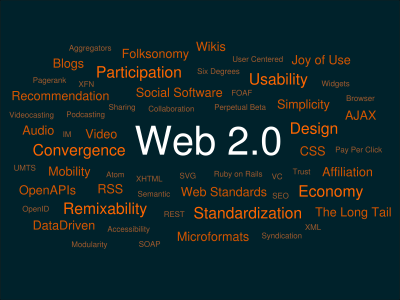
Well, we all know what the internet is... but what is Web 2.0? What's so special about it?
Here are some of the characteristics that define Web 2.0
1) Dynamic content & viewable on multiple platforms
2) User contribution
3) Social Media
4) Online Apps
5) Harnessing Collective Intelligence
Basically, this change allows us as users to be more interactive with what the web has to offer us. It allows each individual (literally) to use the internet to collaborate and showoff their creativity to the world. You can be famous with a click of a button.
1. Dynamic Content/Viewable on multiple platforms
No more shall the internet just be what it is. It's always changing. Dynamic content is information that is always changing. For example, you can now get interactive pages that let you personalize your own space the way you want it to be shown to you. For example, this blog can be displayed the way I want it to be displayed. I want the home page to be layed out the way I want it to and move different modules around the way I want.

And not only is information always changing, you can now bring this content with you however you like. If you don't want to watch your favourite episode of 30 Rock on your laptop on the way to work, you can stick it in your iPod and watch it there. You can now do things with different gadgets that you never got to do before. Cellphones were always meant to be used as portable phones. Now it can take pictures, become your new MP3 player, your organizer, your photo album, etc.
2. User Contribution
 The internet isn't used now strictly for professionals. It's used by anyone who knows how to use a computer and has internet. The interchangability of information allows content from almost anything and anyone to be put on the internet. For example, look at a specific forum board like on your favourite celebrity on IMDB.com. You can start your own discussion with those who have the same interest in a celebrity as you do and chat about him/her. Your input also rates your celebrities and tells IMDB.com how popular your celebrity is based on user generated hits. This is called a "User Generated Value", while your input on celebrities is your "User Generated Content."
3. Social Media
 It's a new way of socializing, and knowing people. It's great to be able to reach all your professional friends in one place. LinkedIn is an example of why Web 2.0 exists. It's like your own personal resume with direct links to your professional co-workers, references and connections. You can join groups that you relate to, meet new people who can potentially hook you up with a new job and get your old bosses to recommend you! This is basically YOU online, and an easy way for someone to pass by your page and know all about who you are, with the click of a button!
4. Online Applications
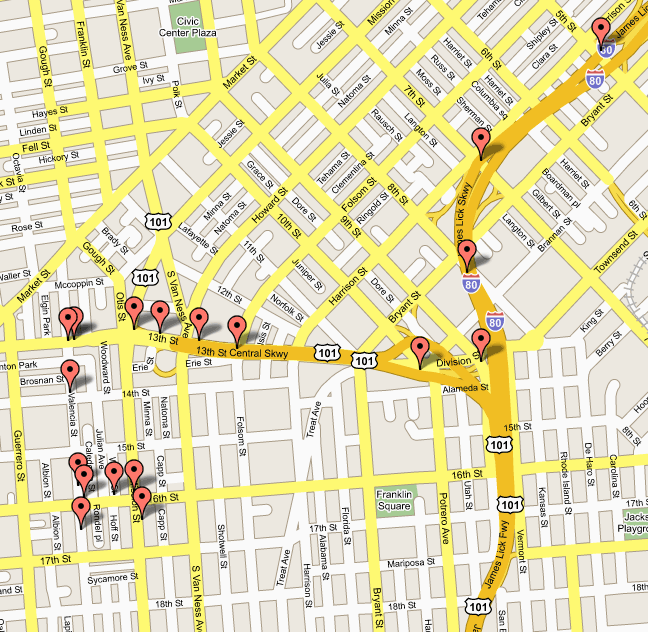 It works just like software on your computer, except you do it online... right from your browser! Look at something like Google Earth and Google Maps, you basically have the whole world, including your GPS online. Plan your own routes, look for specific places, find out where the nearest restaurant is from your house! It's a fairly simple concept, it's software that functions online.
5. Harnessing Collective Intelligence
Sites are now thinking for themselves. They collect data from users who visit the site and inputs their opinions into what the website does and makes changes in it's content in order to make things better. This is usually done by the visitors instead of site owners. Something as simple as tagging, which is done by users of the site of something like Blogger! When writing blog posts, you are able to label your posts with little keywords which will help organize content. Along with this, it is now easier for amateurs to create content which would usually be left for professionals. This is called "crowdsourcing." Learning something like HTML programming used to be the way to make a website, now there are webbuilders that come with free hosting space like Yahoo Geocities that helps you create your own personalized websites, and all you have to know is how to use a mouse and keyboard.

Thursday, October 30, 2008
Flash Assignment/Artist Statement/Comments (Week 9)
View Flash Assignment Here
View Flash Artist Statement Here
Adobe Flash! A powerful web innovation, with a lot of hard work put into it! Doing this assignment really makes me appreciate all the work flash programmers do. It looks simple, but it's harder than it looks. Behind these animations are a lot of code, stressful hours and sleepless nights. If you know how to use this program, it could prove handy and easy for web innovation! After seeing some work my peers created in Flash, I figured that you could tell who has a lot of experience with flash, and who is new to it. I find that Flash is an experience you must keep building in order to really good at it, almost like anything else. But this program, takes time and patience. You can practically create movies and very hilarious stories through the use of Flash. It just takes time...
View Flash Artist Statement Here
Adobe Flash! A powerful web innovation, with a lot of hard work put into it! Doing this assignment really makes me appreciate all the work flash programmers do. It looks simple, but it's harder than it looks. Behind these animations are a lot of code, stressful hours and sleepless nights. If you know how to use this program, it could prove handy and easy for web innovation! After seeing some work my peers created in Flash, I figured that you could tell who has a lot of experience with flash, and who is new to it. I find that Flash is an experience you must keep building in order to really good at it, almost like anything else. But this program, takes time and patience. You can practically create movies and very hilarious stories through the use of Flash. It just takes time...
Friday, October 24, 2008
Music Video Budgets (Week 8)
Music video budgets started not too long ago. Anything fairly new at the time, no matter how cheap or expensive, how beautiful or ugly, if it was something that nobody has experienced before, it would earn a "wow." Back in the days of when music videos emerged, such as Queen's "Bohemian Rhapsody", it was something new and exciting, just like when radio emerged. It wasn't about the quality back then, it was the experience.
After the who phenomenon of music videos emerging with music, it demanded more sophisticated, creative ways to make music videos which had a huge impact on record sales. It had to be made in such a way that it would now appeal to the largest possible audience. This is when music videos started becoming mainstream and expensive videos started emerging, such as "Video Killed The Radio Star" on MTV. The further we advanced, the more money we spent in order to make the impossible, possible. Until......
Youtube.
Advancing from television, to the internet and now to the current "Web 2.0" there is much more input and interactivity between the internet and normal users such as you and me. You can now make people celebrities and with the input of a true audience instead of a select powerful few. Homemade video productions are now the star of YouTube and all you need is a camera, computer and internet connection. Compare this, to the costs of making a professional music video such as Plain White T's video "Hey There Delilah" which was released in the same year as OK Go's music video "Here it Goes Again." The production differences between these two videos is enormous, yet OK Go's music video has about 7 million more views than the Plain White T's.
It just goes to show us that now with YouTube, homemade productions are cheap, and can get you as much attention as mainstream media would.
After the who phenomenon of music videos emerging with music, it demanded more sophisticated, creative ways to make music videos which had a huge impact on record sales. It had to be made in such a way that it would now appeal to the largest possible audience. This is when music videos started becoming mainstream and expensive videos started emerging, such as "Video Killed The Radio Star" on MTV. The further we advanced, the more money we spent in order to make the impossible, possible. Until......
Youtube.
Advancing from television, to the internet and now to the current "Web 2.0" there is much more input and interactivity between the internet and normal users such as you and me. You can now make people celebrities and with the input of a true audience instead of a select powerful few. Homemade video productions are now the star of YouTube and all you need is a camera, computer and internet connection. Compare this, to the costs of making a professional music video such as Plain White T's video "Hey There Delilah" which was released in the same year as OK Go's music video "Here it Goes Again." The production differences between these two videos is enormous, yet OK Go's music video has about 7 million more views than the Plain White T's.
It just goes to show us that now with YouTube, homemade productions are cheap, and can get you as much attention as mainstream media would.
Tuesday, October 14, 2008
Open Blog (Week 7)
Okay, so there's no topic for this week, which leaves this blog wide open for some ideas and discussion. Although I'd like to thank Lori for that extra hour of sleep! :) - You wouldn't believe how much easier to commute for a 10am lecture than for a 9am lecture.
Anyways, back on topic. We had a guest lecturer this week and we were talking about animations. Very interesting how some of these animations come about and people don't realize the little things, such as opening credits of a movie. We say "That's cool. Although I'm just here to watch the movie." It looks like it takes a lot of work, and is unappreciated and doesn't get the same attention as the actual movie would.
Well, maybe except the James Bond ones. Those have been evolving for a long time now, it's almost like tradition to have animated opening credits to a 007 movie.
It's must have been a real hassle to be drawing animations by hand before modern technology took over. Although, it still is a lot of work for animators to create animations using tools such as Flash. The countless hours that is put into animations is remarkable and really has me appreciating those individuals a lot more than before. All we see is a simple animation, and what they see is a bunch of complex code.
Anyways, back on topic. We had a guest lecturer this week and we were talking about animations. Very interesting how some of these animations come about and people don't realize the little things, such as opening credits of a movie. We say "That's cool. Although I'm just here to watch the movie." It looks like it takes a lot of work, and is unappreciated and doesn't get the same attention as the actual movie would.
Well, maybe except the James Bond ones. Those have been evolving for a long time now, it's almost like tradition to have animated opening credits to a 007 movie.
It's must have been a real hassle to be drawing animations by hand before modern technology took over. Although, it still is a lot of work for animators to create animations using tools such as Flash. The countless hours that is put into animations is remarkable and really has me appreciating those individuals a lot more than before. All we see is a simple animation, and what they see is a bunch of complex code.
Friday, October 10, 2008
Flash Assignment (Week 6)
What I was planning to do for my assignment definitely includes stick figures. I was pretty impressed by what you could do with Flash through some of the flash assignments, and examples that Lori showed us. The only problem is, I've never used flash in my life. But the inspiration of the Animation vs. Animator in a violent struggle made me want to play with stick figures.
There are also other inspirations on the web, most of them are stick figures involved with violence, but that's what makes it so funny and interesting, with the stuff you can do in flash.
Xiao Xiao: http://www.newgrounds.com/collection/xiaoxiao.html
Xiao Xiao was created by a man named Zhu who was one of the first people I've seen come up with the originality of the stick figure violence. He has created many episodes and even developed an interactive version of his stick figure to play within the story.
Stick Figure Ninja: http://www.stickfigureninja.com/gallery.php?galtype=3&page=1
Stick Figure Ninja is a more simplistic way of showing me what you could do with stick figures in flash. It was more of a less professional way to show that with stick figures, it is possible to make a story out of something so simple and basic.
To do this in flash, you got to have basic stick figure and animate them frame by frame, if it means if they're walking, you swing their legs and arms back and forth to create a walking motion, and just loop the frames while moving it through my movie. I just need to figure out a story and what I will need my stick figure to do in the movie than just walking.
There are also other inspirations on the web, most of them are stick figures involved with violence, but that's what makes it so funny and interesting, with the stuff you can do in flash.
Xiao Xiao: http://www.newgrounds.com/collection/xiaoxiao.html
Xiao Xiao was created by a man named Zhu who was one of the first people I've seen come up with the originality of the stick figure violence. He has created many episodes and even developed an interactive version of his stick figure to play within the story.
Stick Figure Ninja: http://www.stickfigureninja.com/gallery.php?galtype=3&page=1
Stick Figure Ninja is a more simplistic way of showing me what you could do with stick figures in flash. It was more of a less professional way to show that with stick figures, it is possible to make a story out of something so simple and basic.
To do this in flash, you got to have basic stick figure and animate them frame by frame, if it means if they're walking, you swing their legs and arms back and forth to create a walking motion, and just loop the frames while moving it through my movie. I just need to figure out a story and what I will need my stick figure to do in the movie than just walking.
Tuesday, September 30, 2008
Poster Assignment (Week 5)

“Support Our Troops”
The concept of my poster is to take a traumatic image of a soldier’s return home in a casket to emotionally gain the attention of my cause. The objective is to promote awareness of our soldiers in Afghanistan and to provide them with support through the reality of what can happen. The quotes that were added into the poster are motivational quotes for people to reflect upon why our soldiers are there and to support the individual, brave troops currently in Afghanistan. My target audience is aimed at all of the Canadian citizens whose rights and freedoms are being defended by their soldiers overseas.
When starting with the initial image, I wanted to emphasis the casket, as that was the most important part of the poster. It is what gives the viewers the emotional touch and allows them to connect to the poster’s message. To emphasis this, I created a clone of the picture, allowing me to keep the colour of the casket, and grey scaling the rest of the background to provide a more gloomy, and depressing feel. To emphasis this even more, I decided to decrease the brightness of the image, which then allowed for a darker colour to come about in the image, especially underneath the casket. Additionally, I wanted to have the text stand out because there is an important message being expressed in the text. To do this, I slightly blurred the grey background and added a white and yellow text, which contrasts the grey colour of the background. The alignment of the text is different because I wanted the viewer to look closely at one text and allows it to be easily distinguished from each other. I wanted to space out the proximity of my poster’s elements to prevent clustering, allowing for an easy read.
Some problems that I encountered while creating my poster was trying to select the casket using the polygon lasso tool, especially around the area where the fingers of the casket barer. To achieve a better cut using the lasso tool, it was more accurate to zoom in and magnify the specific area of the cut. If there were further cuts that I needed to make, I would use the eraser tool to erase some parts of the casket layer so it would blend in accurately with the grey scale background. I also found it complicated to change something I had done at the very beginning. For example, I had made a few cuts to the image that I wanted to keep, but it was done near the very beginning of the image editing. Unfortunately, Fireworks’ history only can undo a certain number of steps before it is erased from the history.
I learned that Fireworks is a very powerful image editor and has many features that we have yet to learn. I feel that my piece met the original goal of my message, which was to increase awareness of our soldier’s sacrifices overseas and it can connect to its audience emotionally.
Saturday, September 27, 2008
Typography (Week 4)
 (http://www.thy.com/images/skylife/8-2007/497/26_497garantigaleri2.jpg)
This image as you can clearly tell just by looking at it, seems like it was a drawing made by a child. The letters are all over the place, and look as if they have been drawn as a child would with a crayon. It is a child trying to share a message to children and other living things that war is not healthy. The typography is very effective as it tells the readers who's actually behind this drawing without actually telling the reader. I find that this is very effective because children are always the most vulnerable in war and their innocence create guilt to soldiers at war, and this is one effective way to address that.
 (http://www.fullhalloween.com/blog/wp-content/uploads/2008/08/silent_hill.jpg)
This poster was for the thriller film "Silent Hill" which can already be described through its use of typography in it's poster. The text of "Silent Hill" provides the audience with a curious outlook as to what this movie may be about. The text is very different from the ordinary as it is not entirely solid, and somewhat distorts it's own solid letters, leading to little sharp points sticking out from the side of the letters, creating a feel of something unexpected. The Courier font above which states "Welcome to Paradise" is useful because courier is used for scripts, which makes this "paradise" seem scripted, almost as if there's an ironic scene going on where the audience can sense what is going to happen, while the character in the movie is clueless. I think this typography is effective in creating an overall theme of the movie, at the same time making us want to watch the movie to know what this movie is actually about.
 (http://www.mincava.umn.edu/documents/posters/poster2b.jpg)
This poster shows how effectively BOLDING and Italicizing can further emphasis your points and make a huge difference in representation. It makes "VIOLENCE" and "ABUSE" stand out without the use of the caps lock button. Bolding gives a word a stronger, more ... for lack of a better term Bold look. In regards to "free" it's italics create a more softer feel, yet emphasising how important it is on the poster (Because if it wasn't there or emphasised, it would be a Violence and Abuse facility - the exact opposite message). The font used is Ariel, a professional looking font, and standard for professional looking posters, as this is not trying to make any creative point, but to show that this is a violence and abuse free facility. I think the bold and italics allow it to stand out of the poster, and one of the very first things you notice. Which is of course, effective in every way.
Monday, September 15, 2008
File Types/Compressions (Week 3)
Before the third lecture we had on file types and compressions, I've only heard of one picture format... .JPEG ... and for me being a computer geek, it's pretty bad that I didn't even know..... till now!
Maybe it's because I was always used to images that required millions of colours. I've never really worked with vectors before because I personally am not so great with visual design. It turns out that .GIF is pretty useful for vector drawings! I didn't know what PNG was (a working file for Adobe Fireworks), nor did I know the difference between them, which one was better, etc.
With that said, it will allow me to export images professionally depending on which type of compression exports the highest quality of my image while saving as much data as possible.
Maybe it's because I was always used to images that required millions of colours. I've never really worked with vectors before because I personally am not so great with visual design. It turns out that .GIF is pretty useful for vector drawings! I didn't know what PNG was (a working file for Adobe Fireworks), nor did I know the difference between them, which one was better, etc.
With that said, it will allow me to export images professionally depending on which type of compression exports the highest quality of my image while saving as much data as possible.
Sunday, September 14, 2008
The CRAP Principles. (Week 2)
Yep that's right! The CRAP principles of visual design! Although, it doesn't necessarily mean that it's "crap". But it is, one of the most useful crap you'll ever use in graphical design. What is crap?
Contrast
Repetition
Alignment
Proximity
----------------

Image #1: Pay Per Click Offer Advertising Platform
(http:/payperclickoffer.com/tag/business-plan/)
This image was found on a site which is an article about an ad platform which offers advertising to both advertisers and publishers . First, we'll look at the contrast of this image. There's not much contrast in this image, as the author is trying to express a message of online users who all use computers to connect to different people on the internet. (Hence, all the different green network connections). The biggest contrast would be the green lines which so no pattern whatsoever, and the different sizes of each manikin to create a depth perception. The main colours used go very well together, and emphasis certain elements of the image. There is no trouble at all when glancing at this image. There is no text however, but it does attract someone to wonder what this image is trying to express.
Repetition in this image is seen easily. All of the related content all have a standard colour. For example, the manikin are all in the same colour (with different shades however), and the connection, which looks somewhat of a computer circuit board, is what connects these individuals together. The repetition of the lines and the rings around each "user" help us understand that these are all similar people who are all unified in some way.
There is no identifiable alignment in this image. All of the different "users" are scattered throughout the image and there is no pattern available.
In regards to proximity, every "user", they are all spread out with enough space between them to not interfere with each other. If that was true, it would be a very messy image, confusing those who are looking at it. Everything is spaced out enough to not interfere with the main point of the image, which is connecting users to unite electronically through something like the internet.
----------------
Image #2: Condom Ad
(http://www.geckoandfly.com/2007/10/25/creative-condom-ads/)

This image was an advertisement which promotes safe sex, and making an analogy of having unprotected sex as dangerous as fighting a fire without proper protection.
The contrast in this image is significant. As the colours which stand out most are the most important messages in this image. The fire which contrasts the dark background makes it the first thing people will see when looking at this photo because it attracts so much attention. Then the contrast of a white suit on a dark background allows us to easily identify protective suits and the contrast of a naked man which stands out from the ordinary.
The repetition of the individuals behind the hose allow for us to identify what is out of the ordinary. You see three individuals, two are alike but one is different. It allows the viewer to quickly and easily see the message of what is being emphasized in this image, along with the alignment of the individuals to the fire. The alignment of the logo is placed in the right spot, where it is easily discovered and not distracting or covering any of the important factors used to express this message.
The proximity of the individuals from the fire was done in mind by the creator to keep everything close together but still far enough that visuals aren't blocking each other. For example, the fire rages right beside the first firefighter rather than behind him, allowing for the contrast to work and catch the attention of the viewer.
----------------
 Image #3: Vibrant Design
(http://www.highonart.com/services.htm)
The contrast in this image is significant. It uses various colours that stand out from each other. It doesn't use different shades or variations of colours, but uses main colours which can be easily distinguished from each other. Making the contrast very significant. The text stands out greatly as there is no white in the darker portions of this image, allowing the colour of the text and the text itself to stand out.
The reptition and alignment of the way these colour ribbons are laid out shape what looks like a fan of colours. The reptition of the colours and the alignment of where they are placed create a shape for us so that the picture looks like something more than just a bunch of random colours. Rather, it looks more artistic as there is a message of "vibrant" and the shape repeats itself expressing the "vibrant" design of this image. The proximity of each set of colours are great enough that we can identify that there are 3 different sets laid our one behind another.
----------------

Image #4: iCyt Visionary Bioscience
(http://www.blakeharvey.com/blake_portfolio/icyt_journal_ad.htm)
The contrast in this image is mostly used through shades of black and white, along with the different shapes of what looks like air bubbles. The contrast of brightness throughout this image gives it the meaning of something related to "a new beginning." The contrast in the bubbles and brightness signify something mysterious and is very effective in advertising by playing with a consumer's curiousity.
The repetition of the idea of these air bubbles flowing towards the light emphasis the fact that something big is coming and it shows no alignment or uniformity through the way the bubbles are on the poster. The text however, is aligned symetrically and is centered, which provides it with a neat and professional look. The proximity of everything, especially the air bubbles is laid out far enough to be identified as such. The text is spread out neatly and can be read with ease and only with a moment's notice.
Contrast
Repetition
Alignment
Proximity
----------------

Image #1: Pay Per Click Offer Advertising Platform
(http:/payperclickoffer.com/tag/business-plan/)
This image was found on a site which is an article about an ad platform which offers advertising to both advertisers and publishers . First, we'll look at the contrast of this image. There's not much contrast in this image, as the author is trying to express a message of online users who all use computers to connect to different people on the internet. (Hence, all the different green network connections). The biggest contrast would be the green lines which so no pattern whatsoever, and the different sizes of each manikin to create a depth perception. The main colours used go very well together, and emphasis certain elements of the image. There is no trouble at all when glancing at this image. There is no text however, but it does attract someone to wonder what this image is trying to express.
Repetition in this image is seen easily. All of the related content all have a standard colour. For example, the manikin are all in the same colour (with different shades however), and the connection, which looks somewhat of a computer circuit board, is what connects these individuals together. The repetition of the lines and the rings around each "user" help us understand that these are all similar people who are all unified in some way.
There is no identifiable alignment in this image. All of the different "users" are scattered throughout the image and there is no pattern available.
In regards to proximity, every "user", they are all spread out with enough space between them to not interfere with each other. If that was true, it would be a very messy image, confusing those who are looking at it. Everything is spaced out enough to not interfere with the main point of the image, which is connecting users to unite electronically through something like the internet.
----------------
Image #2: Condom Ad
(http://www.geckoandfly.com/2007/10/25/creative-condom-ads/)

This image was an advertisement which promotes safe sex, and making an analogy of having unprotected sex as dangerous as fighting a fire without proper protection.
The contrast in this image is significant. As the colours which stand out most are the most important messages in this image. The fire which contrasts the dark background makes it the first thing people will see when looking at this photo because it attracts so much attention. Then the contrast of a white suit on a dark background allows us to easily identify protective suits and the contrast of a naked man which stands out from the ordinary.
The repetition of the individuals behind the hose allow for us to identify what is out of the ordinary. You see three individuals, two are alike but one is different. It allows the viewer to quickly and easily see the message of what is being emphasized in this image, along with the alignment of the individuals to the fire. The alignment of the logo is placed in the right spot, where it is easily discovered and not distracting or covering any of the important factors used to express this message.
The proximity of the individuals from the fire was done in mind by the creator to keep everything close together but still far enough that visuals aren't blocking each other. For example, the fire rages right beside the first firefighter rather than behind him, allowing for the contrast to work and catch the attention of the viewer.
----------------
 Image #3: Vibrant Design
(http://www.highonart.com/services.htm)
The contrast in this image is significant. It uses various colours that stand out from each other. It doesn't use different shades or variations of colours, but uses main colours which can be easily distinguished from each other. Making the contrast very significant. The text stands out greatly as there is no white in the darker portions of this image, allowing the colour of the text and the text itself to stand out.
The reptition and alignment of the way these colour ribbons are laid out shape what looks like a fan of colours. The reptition of the colours and the alignment of where they are placed create a shape for us so that the picture looks like something more than just a bunch of random colours. Rather, it looks more artistic as there is a message of "vibrant" and the shape repeats itself expressing the "vibrant" design of this image. The proximity of each set of colours are great enough that we can identify that there are 3 different sets laid our one behind another.
----------------

Image #4: iCyt Visionary Bioscience
(http://www.blakeharvey.com/blake_portfolio/icyt_journal_ad.htm)
The contrast in this image is mostly used through shades of black and white, along with the different shapes of what looks like air bubbles. The contrast of brightness throughout this image gives it the meaning of something related to "a new beginning." The contrast in the bubbles and brightness signify something mysterious and is very effective in advertising by playing with a consumer's curiousity.
The repetition of the idea of these air bubbles flowing towards the light emphasis the fact that something big is coming and it shows no alignment or uniformity through the way the bubbles are on the poster. The text however, is aligned symetrically and is centered, which provides it with a neat and professional look. The proximity of everything, especially the air bubbles is laid out far enough to be identified as such. The text is spread out neatly and can be read with ease and only with a moment's notice.
Wednesday, September 3, 2008
Digital Media Lecture Reflection (Week 1)
Welcome!
So this is my first post here as a Radio & Television Arts student with Ryerson University. This is actually going out for marks... so, this is why I'm here! Haha, that's not all... I'm also here because I need a place to reflect... on something like, Digital Media!
Ok, so Digital Media... it's nowhere to be found in the program's name, but this program is like millions of years old, so it hasn't been updated to Radio & Television & Digital Media. So we've advanced so far ahead of technology, that all we need to communicate is through 0s and 1s. Amazing isn't it? We (as in, us humans) can't speak that language though, but that's why we have computers! So if I went 00101001010001010110110 (P.S. I have no idea what i just said), computers would translate that for me to read. I guess you can already tell that I knew quite a bit about digital media before actually going to the class, but there's still so much more to learn. That's why I'm here. This blog will allow you to learn with me, in my journey through RTA!
Digital Media is taking over the world. That's why we must know about it to be in this industry. Look anywhere. There's digital technology everywhere. From your cable box at home, to your computer, to your cellphones, etc. It's everywhere. That's why we need to learn about it in order to be able to produce content that will require these skills!
Anyways, enough blogging for now, afterall, I paid a good amount of money to Ryerson in order to open up this up for school! And get marks for it! :)
Til then.
So this is my first post here as a Radio & Television Arts student with Ryerson University. This is actually going out for marks... so, this is why I'm here! Haha, that's not all... I'm also here because I need a place to reflect... on something like, Digital Media!
Ok, so Digital Media... it's nowhere to be found in the program's name, but this program is like millions of years old, so it hasn't been updated to Radio & Television & Digital Media. So we've advanced so far ahead of technology, that all we need to communicate is through 0s and 1s. Amazing isn't it? We (as in, us humans) can't speak that language though, but that's why we have computers! So if I went 00101001010001010110110 (P.S. I have no idea what i just said), computers would translate that for me to read. I guess you can already tell that I knew quite a bit about digital media before actually going to the class, but there's still so much more to learn. That's why I'm here. This blog will allow you to learn with me, in my journey through RTA!
Digital Media is taking over the world. That's why we must know about it to be in this industry. Look anywhere. There's digital technology everywhere. From your cable box at home, to your computer, to your cellphones, etc. It's everywhere. That's why we need to learn about it in order to be able to produce content that will require these skills!
Anyways, enough blogging for now, afterall, I paid a good amount of money to Ryerson in order to open up this up for school! And get marks for it! :)
Til then.
Subscribe to:
Comments (Atom)


 Posts
Posts

